Pillars of Eternity console commands — the full cheats list
The complete list of Pillars of Eternity console commands — enable them with a single
word, then search, filter and copy any command: god mode, add item, experience, attributes and more.
How to enable Pillars of Eternity console commands
Pillars of Eternity ships with a developer console that doubles as the game's cheat layer.
It is single-player only, so nothing you type here touches anyone else's game — it simply
gives you the keys to respec a build, recover from a bug, spawn a missing item or replay the
story with a twist. This page keeps the working Pillars of Eternity console commands in one
searchable place and explains exactly how to enable them — the cheats list below is the whole
set. Here is how to enable the console in three steps.
Enable the console in three steps
1. During play, press the tilde key (~), the one above
Tab, to open the command line.
2. Type iroll20s and press Enter — this switches on cheat
commands for the current save.
3. Type any command below and press Enter. Commands are not case-sensitive, and the console
autocompletes valid names as you type.
One trade-off:iroll20s disables Steam and GOG achievements
for that save file, and it cannot be re-enabled. Keep a separate "sandbox" save if you still
want to earn achievements on your main run.
Interactive
Console commands finder — search the full list
Type to search this list across names and effects, filter by category, and hit copy to grab the
exact syntax. 16 commands and counting.
Command
Syntax & effect
Category
iroll20s
iroll20s
Enables cheat commands for the current playthrough. Type it once after opening the console. This permanently disables Steam/GOG achievements for that save file.
Setup
God
God
Toggles god mode — your party takes no damage and cannot be killed. Run it again to turn it off.
Cheats
Invisible
Invisible
Toggles invisibility so enemies no longer detect or engage your party. Useful for slipping past fights.
Cheats
NoFog
NoFog
Toggles the fog of war on the current map so the whole area is revealed.
World & Map
UnlockAll
UnlockAll
Unlocks the locked doors and containers in the area you are standing in — no lockpicking or Mechanics check needed.
World & Map
Rest
Rest
Rests the party on the spot without using camping supplies and without needing an inn or camp-able area.
World & Map
GiveItem
GiveItem <ItemName> [count]
Adds an item to your stash / inventory by its internal name. Start typing the name and let the console autocomplete it; append a number to add several at once.
Items & Money
GivePlayerMoney
GivePlayerMoney <amount>
Adds the given amount of copper pands (the game's currency) to your party purse.
Items & Money
FreeRecipesToggle
FreeRecipesToggle
Toggles free crafting and enchanting — recipes no longer consume ingredients or copper while it is on.
Items & Money
AddExperience
AddExperience <amount>
Grants the specified amount of experience to the party, which can push characters to the next level immediately.
Character
AttributeScore
AttributeScore "<Character>" <Attribute> <value>
Sets one attribute (Might, Constitution, Dexterity, Perception, Intellect or Resolve) to a chosen value for the named character.
Character
SkillScore
SkillScore "<Character>" <Skill> <value>
Sets a skill (Stealth, Athletics, Lore, Mechanics or Survival) to a chosen value for the named character.
Character
AddAbility
AddAbility "<Character>" <Ability>
Grants an ability or talent to the named character by its internal name (use console autocomplete to find valid names).
Character
RemoveAbility
RemoveAbility "<Character>" <Ability>
Removes a previously granted ability or talent from the named character.
Character
UnlockBestiary
UnlockBestiary
Fills in the bestiary, revealing full creature stats and lore entries as if you had fought each enemy the required number of times.
World & Map
AdvanceTimeByHour
AdvanceTimeByHour <hours>
Advances the in-game clock by the number of hours you specify — handy for shops that restock or time-gated events.
Time
No command matches that search. Try a shorter term, or clear the filter.
Commands are not case-sensitive. The in-game console autocompletes valid names as you type. Availability and exact arguments can vary slightly between patches and between Pillars of Eternity and Deadfire.
The cheats and commands you will reach for most
A handful of Pillars of Eternity console commands cover ninety percent of what players actually
want, and these cheats are the ones most people keep on the list. God
toggles invulnerability for the whole party — nothing can bring you down until you run it
again. Invisible is its stealthy cousin: enemies stop noticing you, which is
perfect for walking a fragile party past an ambush or reaching a locked room without a fight.
Between the two, most "I just want to get past this" moments are solved.
For loot and economy, GiveItem is the workhorse. It adds any item by its
internal name, and because the console autocompletes, you rarely need to know the exact
spelling — start typing and pick from the suggestions. Pair it with
GivePlayerMoney to top up your copper pands, and with
FreeRecipesToggle when you would rather craft and enchant without hunting down
ingredients. The item & money reference goes deeper
on naming and examples.
Rebuilding a character mid-run
Regret a stat spread? AttributeScore "<Character>" <Attribute> <value>
rewrites any of the six attributes — Might, Constitution, Dexterity, Perception, Intellect and
Resolve — for a named party member. SkillScore does the same for Stealth,
Athletics, Lore, Mechanics and Survival. Use the character's name exactly as it appears,
wrapped in quotes. AddAbility and RemoveAbility let you hand out or
strip talents and abilities, and AddExperience pushes the party up a level or
several at once.
For anything the console makes awkward — reordering an inventory, fixing a companion the
console cannot target cleanly, or editing a save you are not currently playing — the
save & asset editor is the better tool. It reaches
into the save file directly, so the exact attribute and skill names it expects are listed on
the attribute & skill reference.
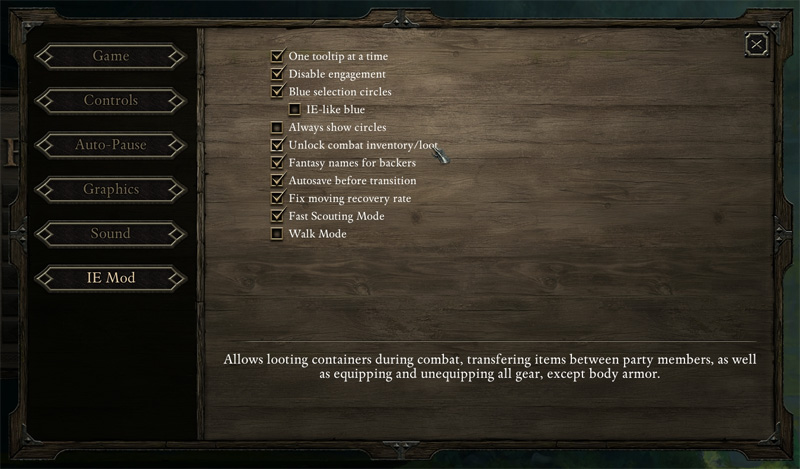
The IE Mod's in-game options panel — many of the conveniences the console gives you, one checkbox away.
World, map and time
Exploration commands smooth out the busywork. NoFog clears the fog of war on the
current map; UnlockAll opens every locked container and door in your immediate
area without a Mechanics check; and Rest lets the party recover on the spot with
no camping supplies. UnlockBestiary fills in creature entries so you can read full
stats and lore, and AdvanceTimeByHour nudges the clock forward for shops that
restock or events that only fire at certain times.
Pillars of Eternity vs Deadfire
Everything above is written for the first Pillars of Eternity. The sequel,
Pillars of Eternity II: Deadfire, keeps the same spirit but runs a different console:
command names and arguments changed, and a few features moved around. If a command here does
not respond in Deadfire, that is expected — treat the two games as separate command sets and
rely on the in-console autocomplete to surface what Deadfire actually accepts. For the sequel
specifically, see the dedicated Deadfire console
commands page.
A worked example: rescuing a broken build
Say your main character was built around a stat spread that simply is not working, and you are
twenty hours in. Here is the whole rescue, start to finish. Open the console with ~
and run iroll20s to enable commands. Respec the core stats with
AttributeScore "Watcher" Might 18 and a line or two more for the attributes you
want to shift, then adjust skills the same way with SkillScore. If the new build
wants different gear, spawn it: GiveItem the weapon and armour that suit it, letting
the console autocomplete the names. Top up for enchanting with GivePlayerMoney 5000,
flip on FreeRecipesToggle, and craft what you need without hunting ingredients. Ten
minutes of console work turns a dead-end save back into the character you meant to play — and if
anything looks off, the backup you made first puts everything back.
Common mistakes to avoid
Three trip people up. First, forgetting iroll20s — without it the other commands
simply do nothing, and it is easy to assume the console is broken. Second, mistyping a
character's name: the name goes in quotes and must match exactly, so lean on autocomplete rather
than memory. Third, expecting first-game commands to work in Deadfire — they are different games
with different consoles. Get those three right and the rest is smooth.
Play it safe
Console edits are safe for normal use, but a quick backup save before heavy experimenting
saves heartache — extreme jumps in level or huge item spawns can occasionally confuse
scripted story beats. Copy your save folder, tinker freely, and you can always roll back.
Everything players ask
Console commands — questions & answers
How do I enable console commands in Pillars of Eternity?
Press the tilde key (~), the one above Tab, to open the console during play. Type iroll20s and press Enter once — this switches on cheat commands for that save. You only need to do it once per playthrough.
Why did my achievements stop unlocking?
Running iroll20s disables Steam and GOG achievements for that specific save file, permanently. If you care about achievements, keep a separate save for experimenting and a clean one for your main run.
Are console commands case-sensitive?
No. God, god and GOD all work. The console also autocompletes as you type, so you rarely need to remember exact spelling — press a key and let it suggest the rest.
What is the command for god mode?
God toggles invulnerability for the whole party. Run it again to turn it back off. Pair it with Invisible if you also want enemies to ignore you.
How do I add an item with the console?
Use GiveItem <ItemName> [count]. Start typing the item name and let the console autocomplete it, then optionally add a number to receive several. The item & money reference covers the naming pattern.
How do I give myself money?
GivePlayerMoney <amount> adds copper pands — the game currency — to your party purse. For example, a large number instantly clears any shopping list.
How do I add experience or level up?
AddExperience <amount> grants XP to the party, which can trigger one or more level-ups at once. Enter a large value to jump several levels.
Can I change a character’s attributes after creation?
Yes. AttributeScore "<Character>" <Attribute> <value> sets Might, Constitution, Dexterity, Perception, Intellect or Resolve. Use the character’s name in quotes. For deeper edits, the save & asset editor is easier.
How do I reveal the whole map?
NoFog toggles the fog of war on your current map, revealing the full area. It affects the map you are on, so run it again on a new area if you want the same effect.
Is there a command to unlock doors and chests?
UnlockAll opens the locked containers and doors in the area you are standing in, with no Mechanics check or lockpicks required.
How do I rest anywhere?
Rest rests the party on the spot without camping supplies and without needing an inn — useful when you are out of supplies deep in a dungeon.
Do these commands work in Pillars of Eternity II: Deadfire?
The ideas carry over, but Deadfire runs its own console with different command names and arguments. Some of the entries here are Pillars-of-Eternity-specific; treat Deadfire as a separate command set.
Will console commands break my save?
They are safe for normal use, but extreme edits (spawning many unique items, forcing very high levels) can occasionally confuse scripted events. Keep a backup save before heavy experimenting.
Can I turn cheats back off?
Toggle commands such as God or Invisible can be switched off by running them again. However, the achievement block from iroll20s stays on that save for good — there is no re-enable.
The console will not open — what now?
Make sure you are in-game (not in a menu), then press the key directly above Tab; on some keyboard layouts that is not the tilde. If nothing appears, check that no overlay (Steam, a recorder) is capturing the key, and that the game window is focused.